Guides Tell You What's Possible. They Can't Tell You What's Best Right Now.
Our transportation guides explain how Disney's system works — every bus route, Skyliner connection, and monorail loop. They help you understand your options before your trip.
But standing at a bus stop at 8:47 AM with a 9:00 AM reservation?
A guide can't tell you:
Whether the Skyliner line is backed up this morning
If today's rain is causing delays
Whether walking would actually be faster right now
What time you'll realistically arrive
Whether the Skyliner will even be running when you travel in June
That's not a flaw in the guide. It's just the limit of static content.
The App Thinks in Real-Time. So You Don't Have To.
Theme Park Compass isn't the website in your pocket. It's a different tool for a different moment.
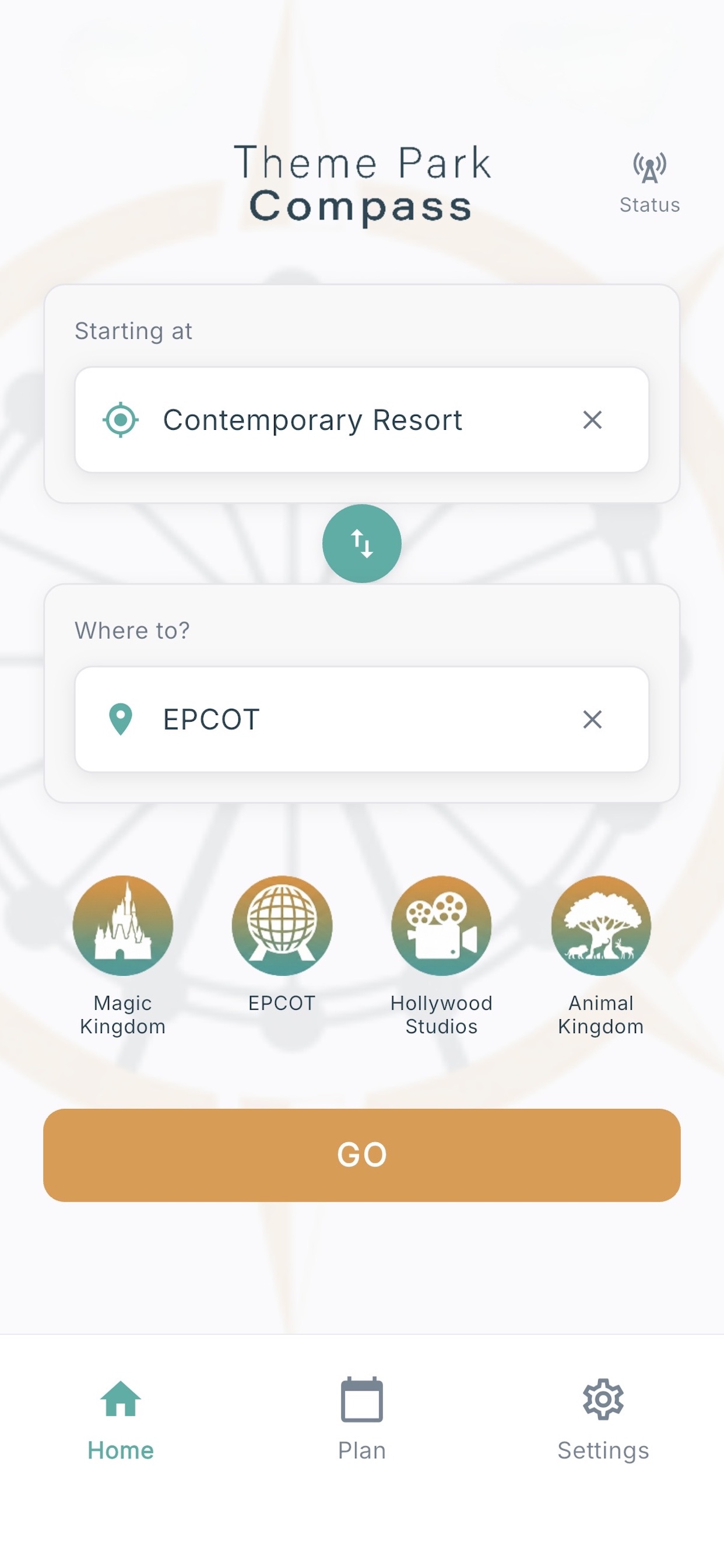
You tell it where you are and where you're going. It tells you:
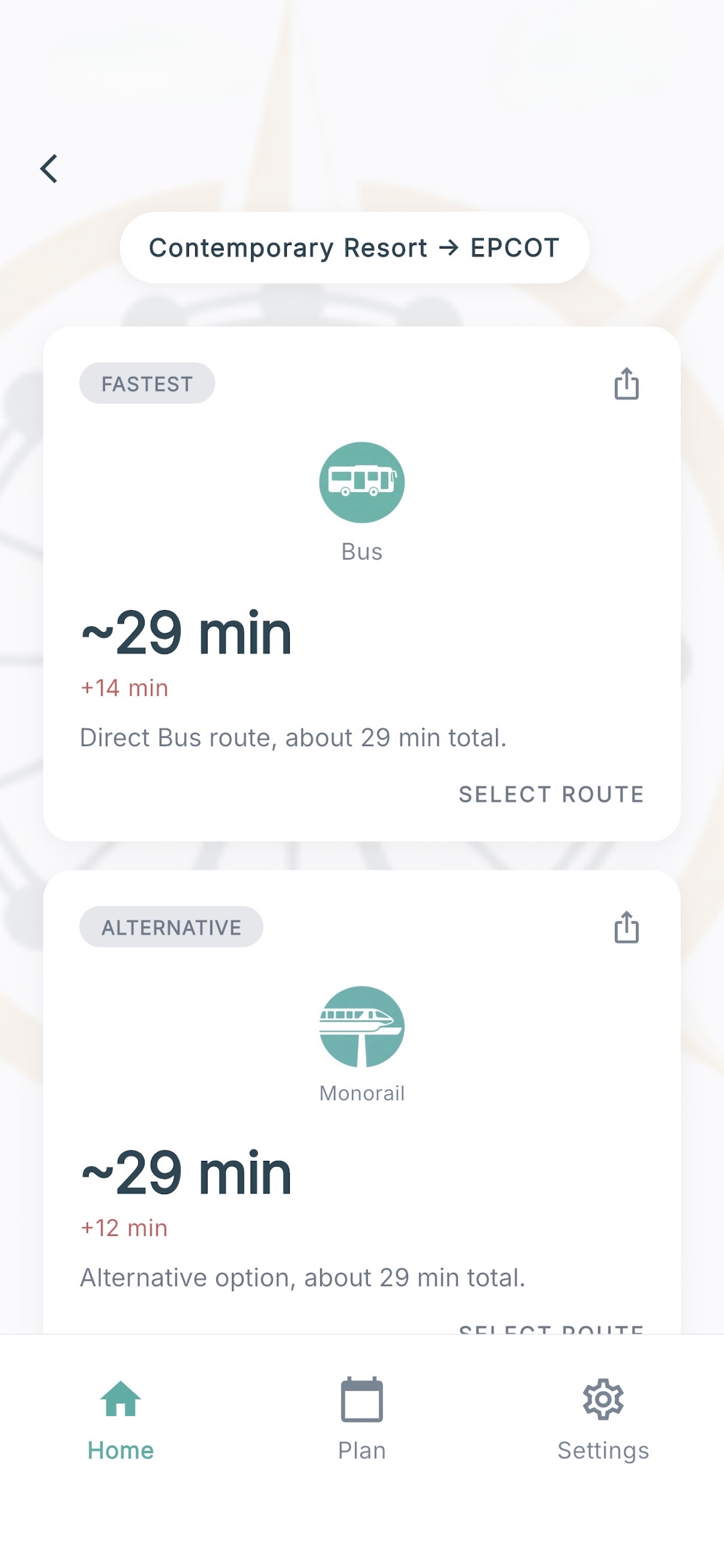
The best route right now (not the best route "usually")
Realistic time estimate for current conditions
Alternative options ranked by what matters to you
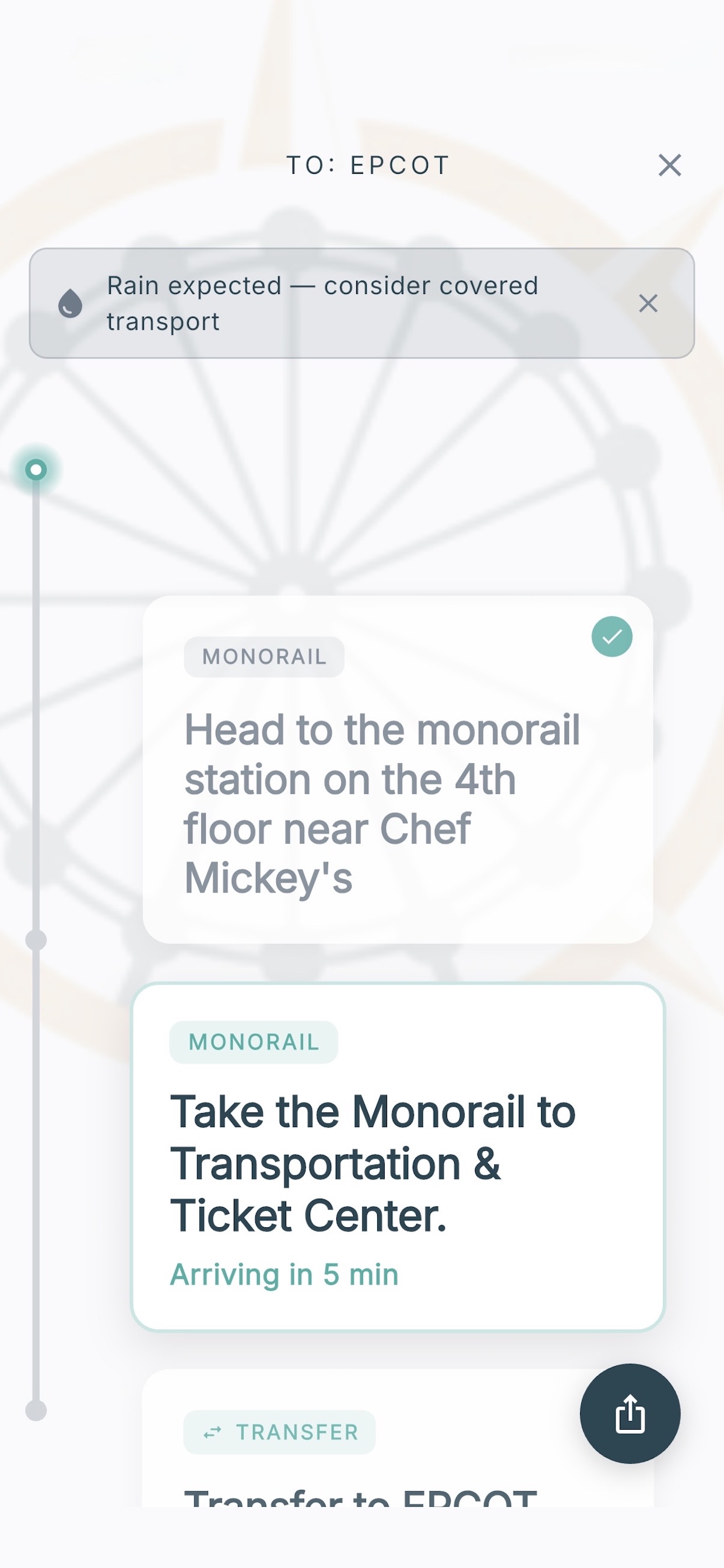
Why it's recommending what it's recommending
The app factors in:
Time of day — rope drop, midday, park close — all different
Weather — rain changes everything
Day of week patterns
Your actual location
And it works before your trip, too.
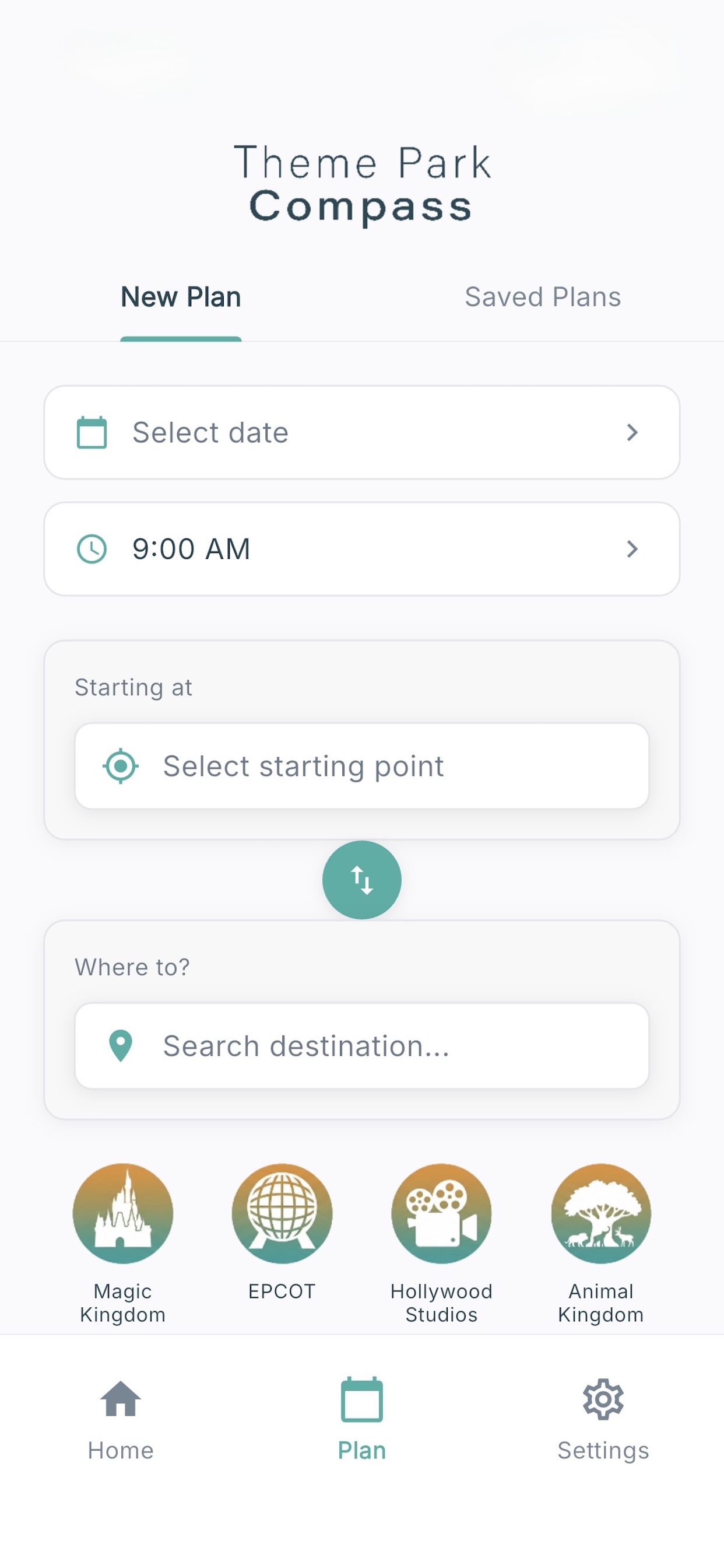
Pick a future date and time, and the app evaluates your route using actual park hours for that day. It shows you what transportation will be running, how long the trip will take, and which option is best — the same analysis it does in real time, projected forward to your travel date. Save the plan, and pull it up when you're on property.
Tell us when. We'll tell you when to leave.
Most planning tools only ask "when do you want to leave?" That's the wrong question for a 12:15 PM dining reservation, an 8:30 AM rope drop, or a fireworks viewing spot you want to claim early.
Switch the Plan tab to Arrive by and tell the app when you need to be there. It works backward from real travel times for your specific route — and tells you exactly when to leave your resort.
Example
Pop Century → Magic Kingdom — 12:15 PM Be Our Guest
Leave by 11:30 AM to arrive about 5 minutes early.
The app picks the route, factors in walking to and from transit, and adds a small buffer so you're not sprinting down Main Street.
Rope drop, one tap.
Staying at a Disney resort? Skip the form. Tap a park on the home screen and the app gives you the leave-by time for that morning — including Early Theme Park Entry if your resort qualifies (all Disney-owned and select partner resorts get a 30-minute head start). The math is Eastern Time-aware, so the cutoff lines up with the parks whether you're planning from California, Texas, or already on property.
Prefer the original "depart at" flow? Still there. All three modes — depart at, arrive by, and one-tap rope drop — coexist on the Plan tab.
Plan Results that prevent surprises.
Once your plan is set, the app surfaces the context that actually changes how the trip goes — only when it's relevant to your specific date, time, and route.
Heat and storm windows. Planning a summer afternoon? You'll see notes like "August afternoons are typically hot (heat index around 105°F). Enclosed transportation like buses and monorail will feel more comfortable than walking."
Early-morning transit start times. A 7:00 AM Pop → Hollywood Studios plan flags "Skyliner opens at 8:00 AM. Buses will be your best option before then." No 45-minute waits for service that hasn't started.
Early Theme Park Entry for resort guests. Targeting rope drop from a Disney resort? You'll see "As a Disney resort guest, you can enter Magic Kingdom at 8:30 AM — 30 minutes before the 9:00 AM official opening." Deluxe and DVC guests also get Extended Evening Hours when they're scheduled.
Closed-park heads-up. If your selected park is closed for refurbishment, a hard-ticket event night, or a private buyout, the app warns you before routing — no more arriving at a shuttered gate at 8:25 AM.
Notices only fire when they apply. A January morning gets nothing. A 3 PM EPCOT plan in August gets the heat notice. A Contemporary → EPCOT plan never gets a Skyliner notice — that route isn't on the network.
New
Knows when walking beats waiting.
Most transportation tools have one answer: take the bus, or take the monorail. But plenty of Disney trips are faster on your own two feet — by the time transit loads and loops the long way around, you could already be walking through the gate. The hard part is knowing which trips those are.
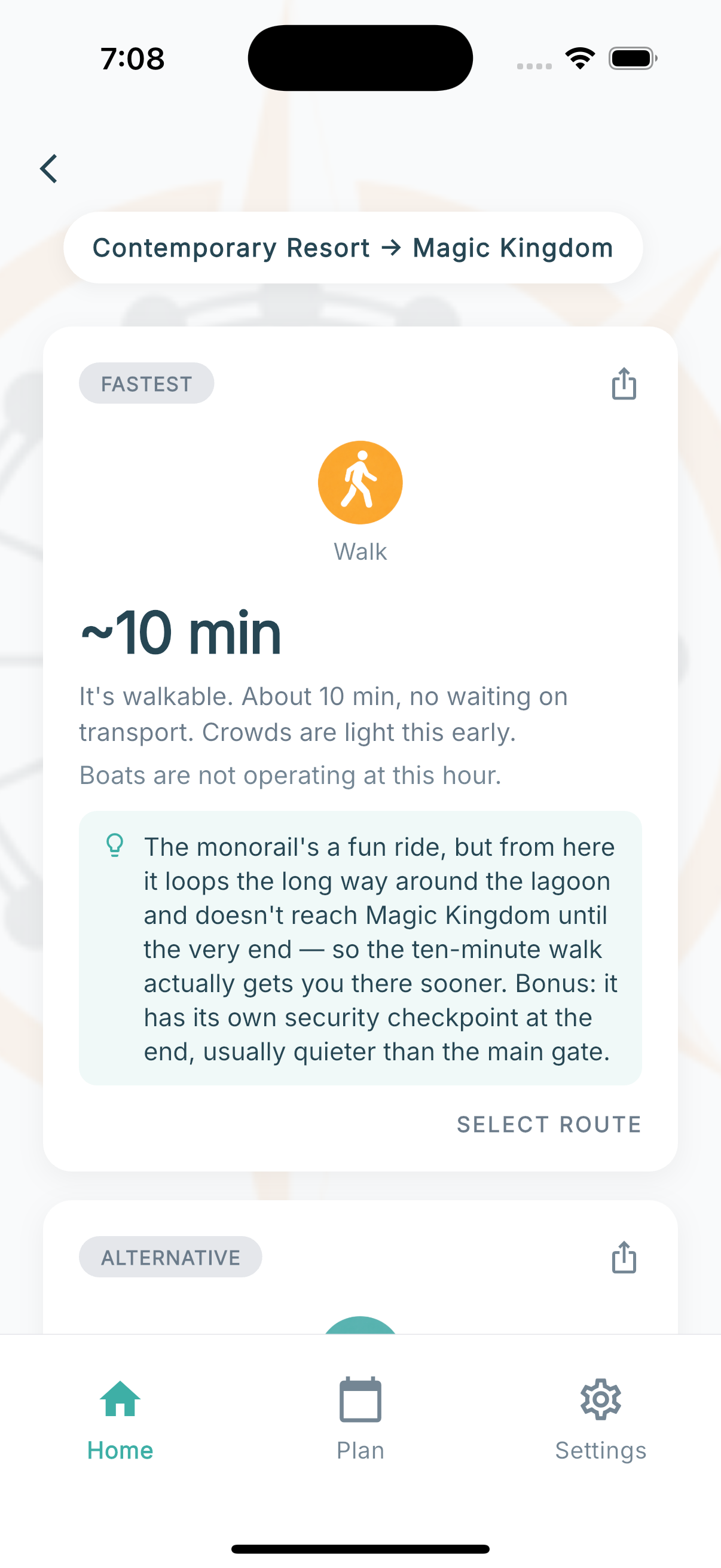
Theme Park Compass weighs the walk against the real wait, not just the distance on a map. When walking gets you there sooner, it says so — and tells you why. Contemporary to Magic Kingdom is about a 10-minute walk; the monorail loops the long way around the lagoon and takes noticeably longer. Beach Club to EPCOT's International Gateway, about 10 minutes on foot. The app knows, and puts the walk first when it wins.
Including the walkways most planners forget.
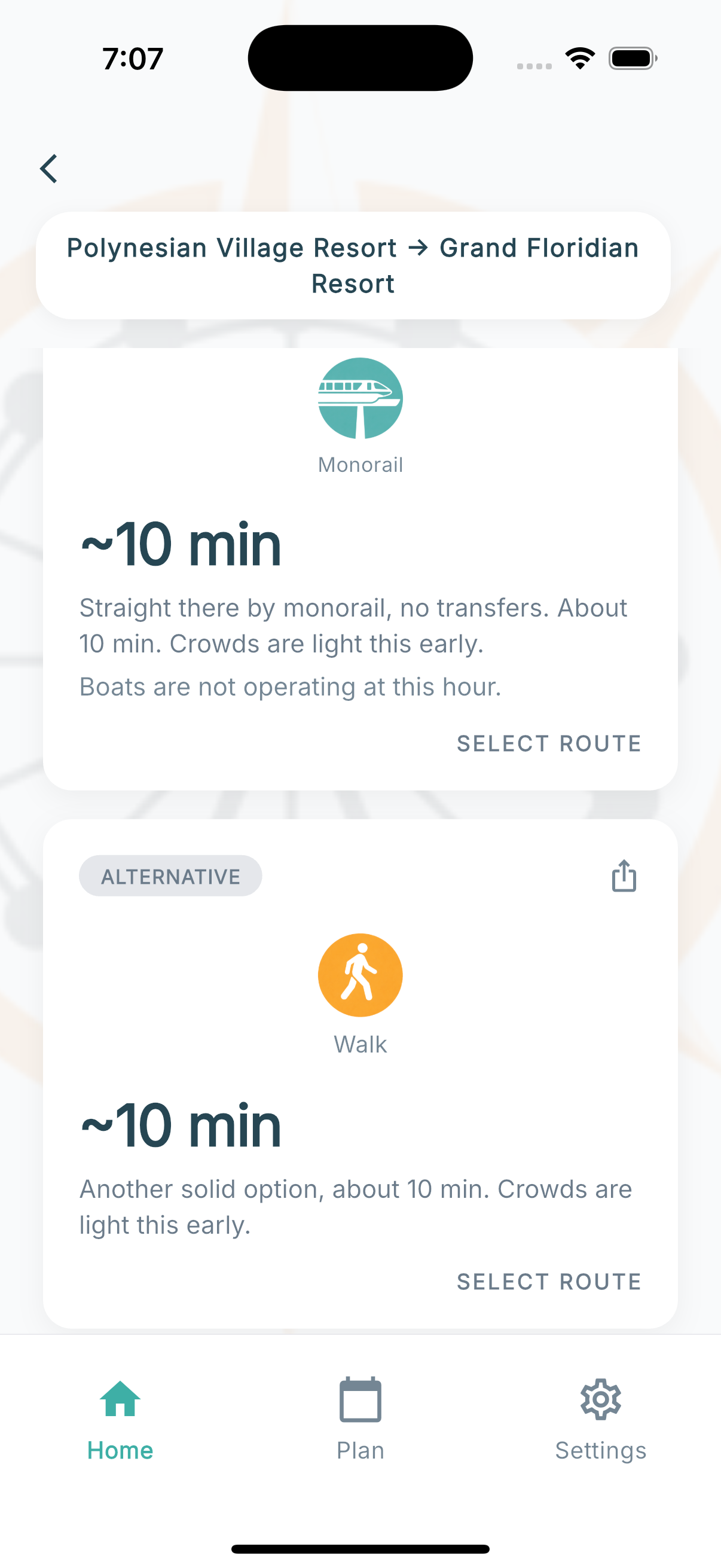
Some of the best shortcuts are the quiet paved paths between neighbors. The Polynesian and Grand Floridian are about a 10-minute lakeside walk apart — the walkway reopened in late 2024, and it ties the monorail at about 10 minutes. Riviera and Caribbean Beach, the same. Compass keeps these in the mix so you're not waiting on transport for a trip you could stroll.
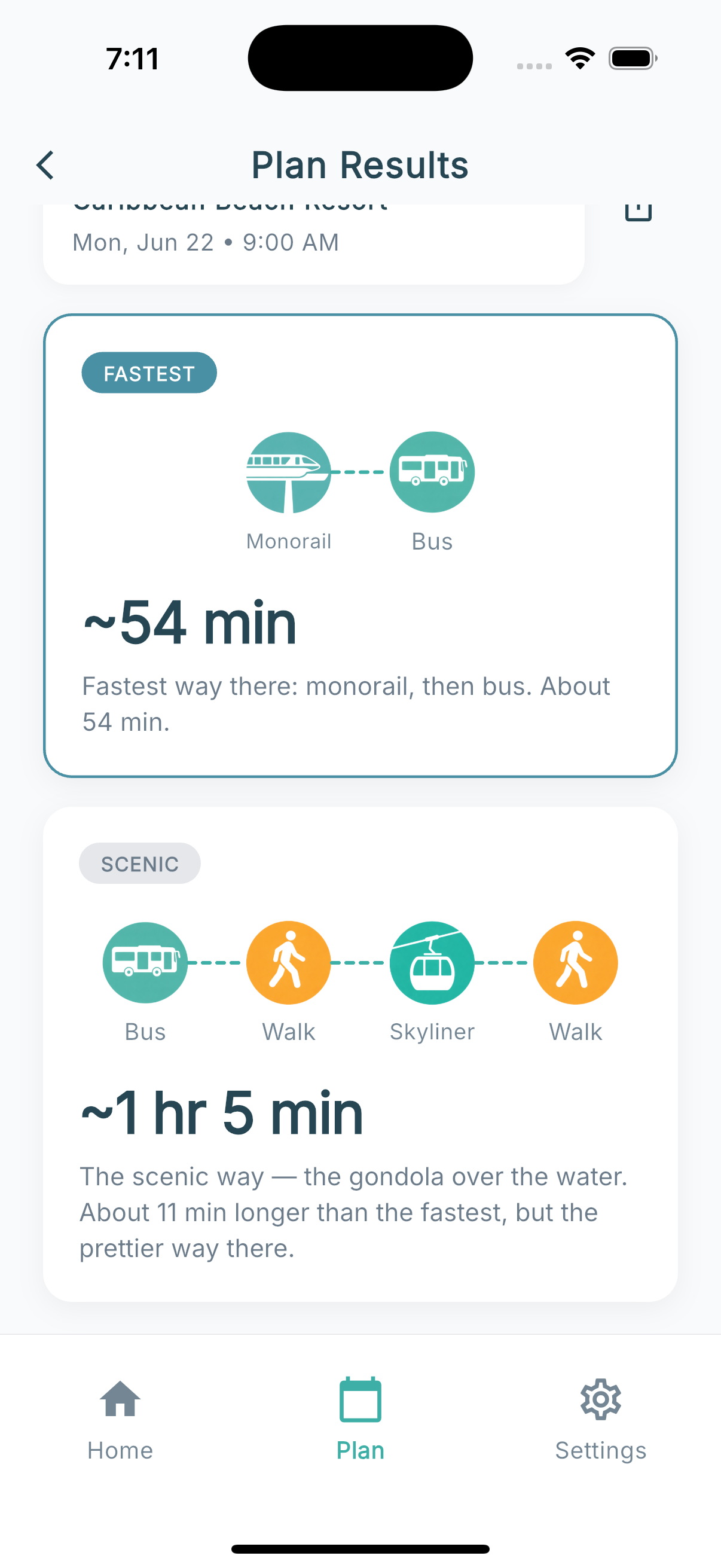
Contemporary → Magic Kingdom: Walk, marked fastest — the monorail loops the long way around.
Polynesian → Grand Floridian: the restored lakeside walk ties the monorail — about 10 minutes, no transfers.
Walk times are in-transit estimates and assume the path is open — Compass weighs heat and weather too, so a 10-minute walk on an August afternoon may not win the way it does on a cool morning.
New
Build the whole day. Navigate it one leg at a time.
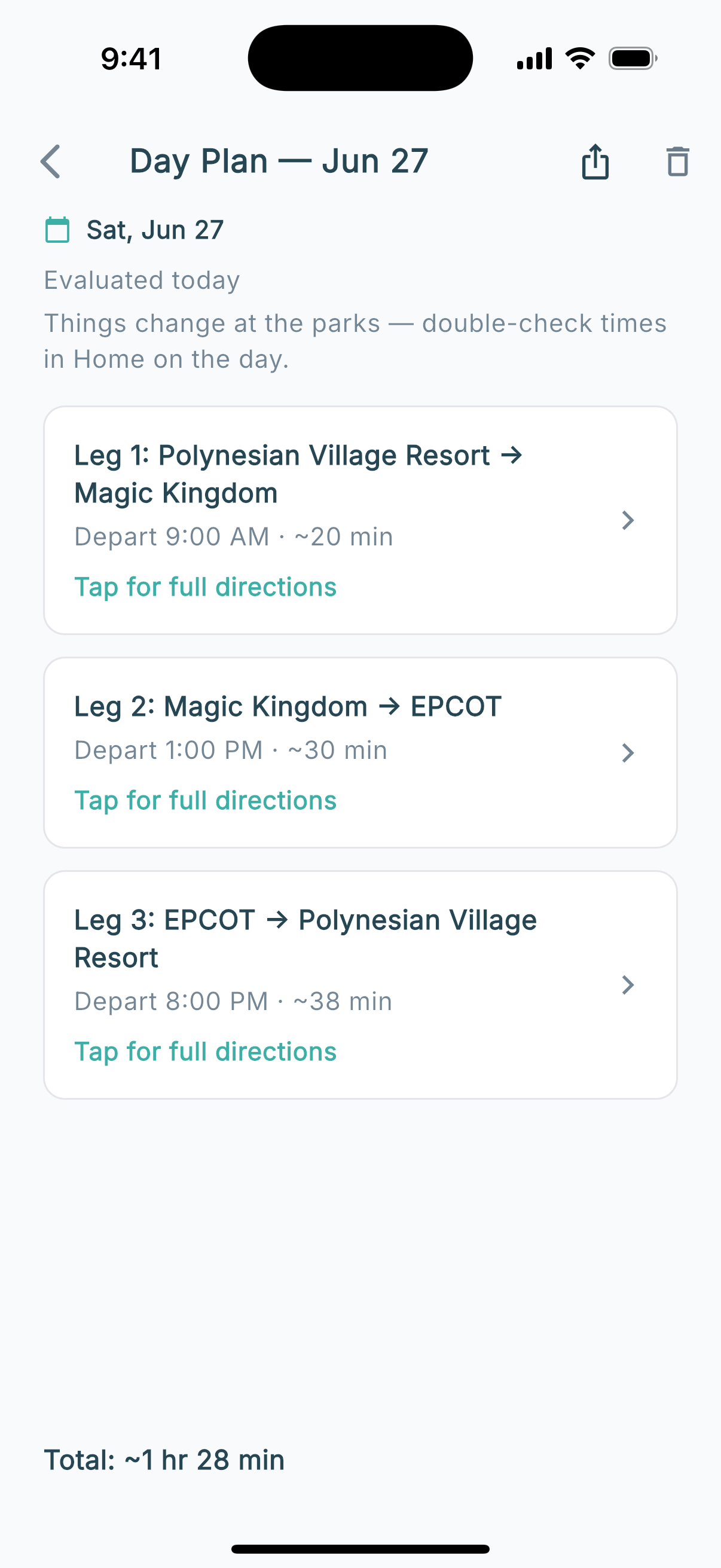
A real park day is never one trip. There's the rope-drop run from your resort, the hop to a second park after lunch, and the ride back when everyone's worn out. Day Plans lets you build all of it as one saved itinerary, with a real route and a real leave-by time for every leg.
Tap any leg to see exactly how to make it.
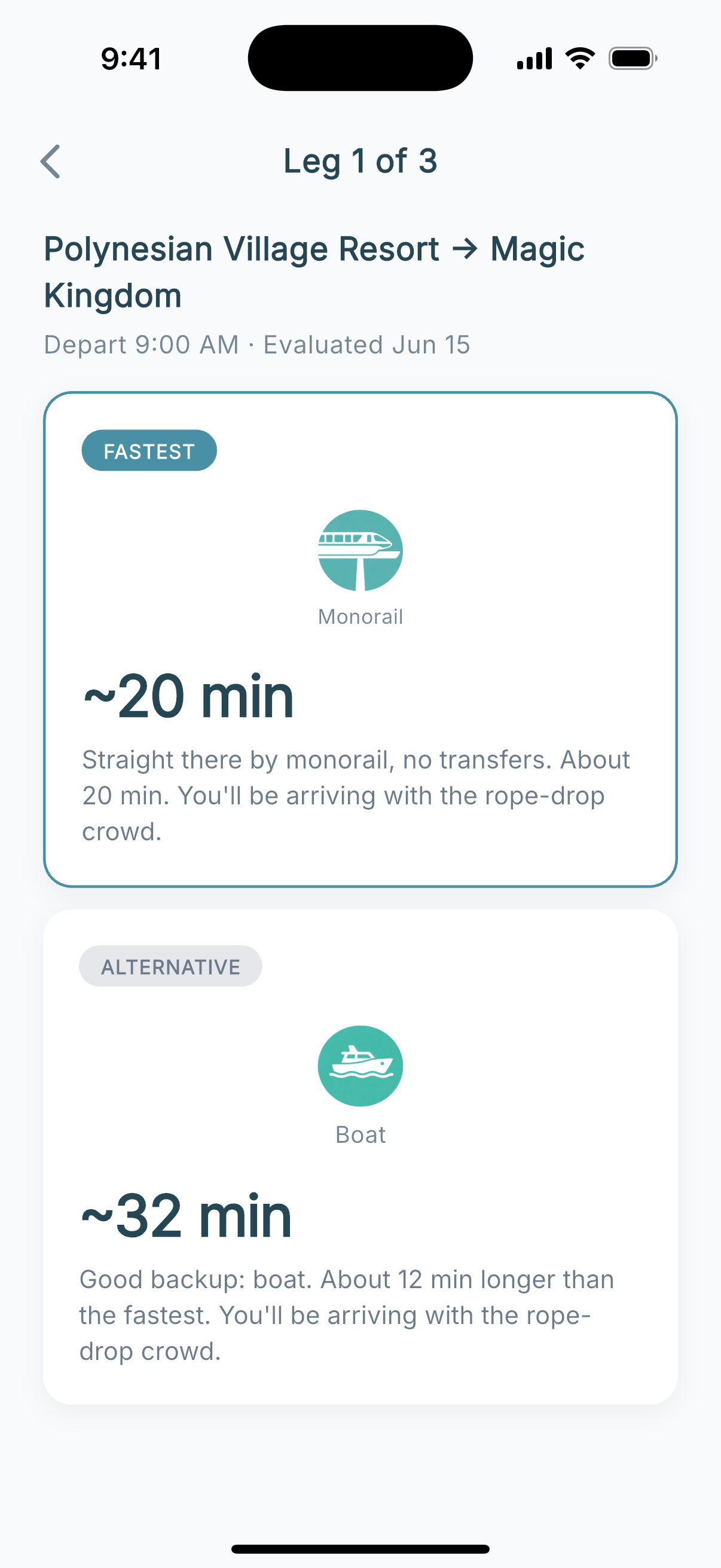
A day plan isn't a static list of times. Tap any leg and you drop into the full route for it: every option, the recommended pick, and step-by-step directions — the same depth you'd get planning that trip on its own. See the whole day at a glance, then make it one leg at a time.
The whole day, every leg routed and timed.
Tap a leg — here, Leg 1 — for the fastest way and a backup, with timing.
Save the whole plan right on your phone — still no account — and pull it up when you're on property. Share it by link or iMessage so the whole party works from the same day instead of a screenshot someone keeps having to scroll.
Every leg recalculates against the date and time you set, so a morning trip that beats the Skyliner's opening, or a late one cutting it close to park close, gets the same heads-up notices a single route would.
Fastest isn't always what you want. Sometimes you want scenic.
A few Disney trips are worth taking the slow way. The Skyliner gondolas drifting over the water. The ferry easing across Seven Seas Lagoon toward Cinderella Castle. The quiet boat to Disney Springs. These aren't just transportation — they're part of the day.
When a route has an option like that, Compass marks it with a Scenic badge and tells you the trade — usually a few extra minutes for a much better ride. So on the mornings you're not racing the clock, you can choose the pretty way on purpose, instead of stumbling onto it by accident.
The Scenic badge spells out the trade: about 11 minutes more for the gondola over the water.
Share the plan, not a screenshot.
Trips with multiple parties — your in-laws meeting you at the gate, the group chat that won't stop debating bus vs. Skyliner — work better when everyone has the same plan.
Tap the share icon on any saved plan and the app drops the full route into iMessage, WhatsApp, your Disney trip group chat, or anywhere else iOS shares to. Recipients see the start point, the destination, the recommended mode, and the timing. Both framings work: "Be there by 12:15 PM" reservations and "Leaving at 9:00 AM" departures share the same way.
Useful when the rest of the party hasn't downloaded the app yet, or when you want one source of truth for a multi-resort meetup at the gate.
Use the Guides to Learn the System. Use the App to Navigate It.
The Website
Understanding how Disney transportation works
Learning which resorts connect to which parks
Reading up on strategies and trade-offs
Researching at your own pace
The App — Planning Your Trip
Checking what transportation runs on your travel date
Comparing route options for a specific day and time
Building a realistic schedule before you leave home
Saving plans to pull up when you're on property
The App — On Your Trip
Standing at your resort trying to get to a park
Deciding between two options in the moment
Figuring out the fastest way back after fireworks
Adjusting when plans change mid-day
Two Ways to Use It.
Right Now
1
Where are you?
GPS detects automatically, or pick from the list
2
Where are you going?
Parks, resorts, Disney Springs
3
See your options.
Ranked by current conditions, with alternatives
Planning Ahead
1
Pick a date and time.
Any future day — and tell us either when you're leaving or when you need to be there
2
Choose your start and end points.
Resort to park, park to park, anywhere to anywhere
3
See what's running and what's best.
Save the plan for when you're on property
Same engine, same recommendations. One works in the moment. The other works from your couch.